
Commercial listings live or die on first impressions. Whether you’re leasing an office suite, marketing a retail bay, or presenting a flex unit, the visuals you publish shape buyer and tenant expectations before anyone books a tour. That is why the choice between virtual staging and space photos matters.
For listing teams in Houston, Austin, San Antonio, and nearby markets, this decision is also a production question. What should be photographed as-is? What should be visualized? What supporting media will help prospects understand the space before a tour?
Used well, each approach can clarify scale, use, and potential. Used poorly, either can confuse prospects or, worse, cross compliance lines that invite headaches. This guide on virtual staging vs empty-space photos for commercial listings breaks down the trade-offs, shows you where each method shines, and gives you clear rules to stay onside.

TL;DR
- Use virtual staging to help people visualize temporary uses and layouts, but label the images and include an unaltered photo as well.
- Use photos of the space to convey the actual condition and ceiling height, and pair them with floor plans and dimensions for context.
- Never alter or hide permanent features. If you digitally add or remove movable items, such as furniture or decor, disclose the edit and keep the original photo available.
- MLS, brokerage, state, and consumer-protection rules require truthful, non-misleading images. Some markets have made virtual-staging disclosure rules more explicit in recent years.
- Your safest default is to publish both versions, clearly mark the staged ones, and lead with accuracy.
Understanding Your Options
Before you choose staged or empty photos, start with what a prospective tenant or buyer needs to understand first: condition, scale, layout, potential, or delivery status. The right approach bridges the gap between raw square footage and a prospect’s real-world use case, whether the listing is in Houston, Austin, San Antonio, or a surrounding Texas market.
TK Images supports that process with professional real estate photography, commercial photography, virtual staging, aerial images, floor plans, 3D tours, and property websites. All of these help listing teams present commercial spaces clearly and consistently.
What Virtual Staging Is
Virtual staging is the digital addition of movable, non-permanent elements, such as furniture, artwork, rugs, plants, or decor, to a real photo of a property. Many MLSs and brokerages treat it as a digitally altered image, which means disclosure requirements may apply. Standard photo corrections such as brightness, color, and exposure adjustments are generally acceptable, although adding, removing, or altering permanent features can misrepresent the property.
Clear disclosure is required or strongly recommended in many markets, and some MLSs require the original, unaltered photo to appear near the staged version. When virtual staging is part of the plan, TK Images can build the staged visuals from real listing photos so the final gallery still starts with the property’s actual condition.
What Empty Space Photos Are
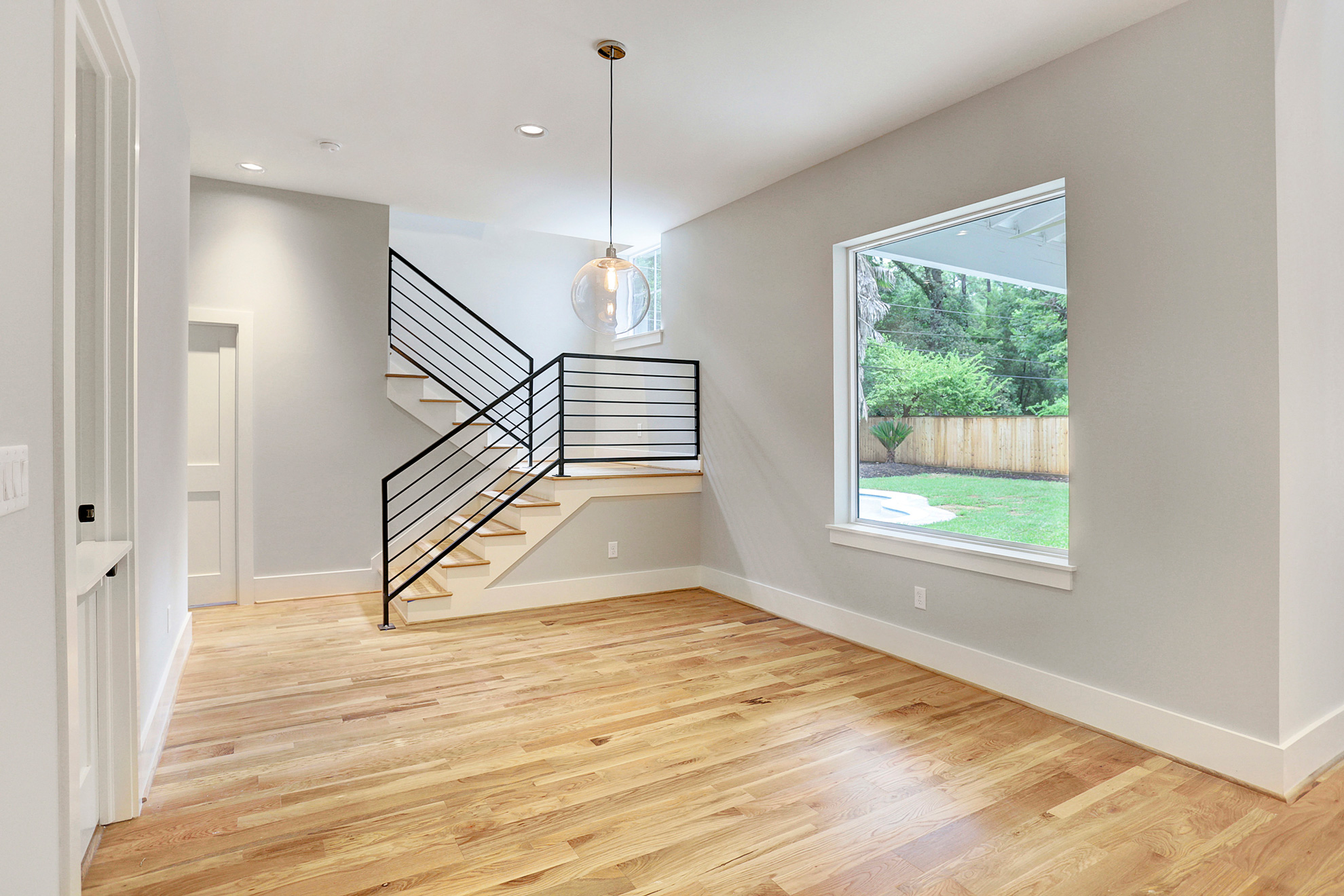
Empty-space photos showcase a property’s current condition, highlighting selling points such as ceiling height, lighting, and slab quality. In commercial real estate, this often includes shell space, which has minimal interior improvements and awaits tenant buildout. Another option is a white box (vanilla shell), which features basic finishes such as drywall, lighting, and HVAC, but does not allow custom tenant modifications.
Exact inclusions vary by deal, so your captions should clarify the delivery condition to avoid guesswork. For shell, white box, and improved spaces, TK Images’ commercial media services can document the empty condition, giving brokers and owners a clean visual baseline before any conceptual staging is added.
When Virtual Staging Helps
Virtual staging can bridge the imagination gap. Prospects can more easily understand how a 2,000 sq ft office might fit workstations and meeting areas, or how a 1,200 sq ft retail bay could support a cash wrap, merchandising, and back-of-house space. It’s especially useful for showing flexible, non-permanent layout concepts or multiple possible uses for the same box. Done well, it speeds comprehension and helps non-experts understand proportion.
Compliance is the guardrail. The Federal Trade Commission’s deception standard focuses on whether a reasonable consumer is likely to be misled materially. The National Association of Realtors Code of Ethics requires that images present a true picture and prohibits the use of misleading images. Many MLSs now require or recommend clear labeling of staged photos, and some require a matching unaltered photo directly before or after the edited one. Exact MLS display rules can vary by platform and market, requiring disclosure for virtually staged or AI-enhanced photos and the inclusion of an unaltered ‘before’ image.
When Empty Space Photos Win
Empty photos are best when the story is height, volume, light, or condition. Industrial and flex listings benefit from unobstructed shots that let viewers see slab quality, column spacing, dock positions, and clear heights. Office or retail users with custom brand standards may prefer a blank slate rather than someone else’s style dropped into the frame.
Space also reduces risk. There’s no gap between photo and reality, which protects trust. For clarity, pair empty photos with a dimensioned floor plan, ceiling-height callouts, and, for office listings, rentable-versus-usable area notes tied to the applicable BOMA or other measurement standard.
Is your listing’s value tied to volume, visibility, frontage, slab condition, or ceiling height? TK Images can prioritize wide, clean commercial photos and add floor plans, aerial imagery, or 3D tours to provide more context for the space.
Side-by-Side Comparison: Virtual Staging vs Empty Space Photos for Commercial Listings
This quick reference helps you choose the visual approach that fits the listing, the likely tenant, and the questions prospects will ask in competitive Texas markets.
| Factor | Virtual Staging | Empty Space Photos |
| Goal | Help viewers visualize use and layout | Show true condition, volume, and light |
| Best For | Office suites, small-format retail, flexible white box | Industrial, shells, renovation projects |
| Compliance Risk | Higher if permanent features are changed or disclosure is missing; often, it must show the original photo | Lower; still must avoid misleading edits or angles |
| What To Disclose | Clearly label as “Virtually Staged” and identify affected images; many MLSs require a before/after pairing | Note delivery condition (shell, white box), any exclusions, and the measurement standard used |
| Speed/Cost | Fast once base photos are shot; timing and cost depend on image count, complexity, and provider workflow | Cheapest to capture; may need extra context like plans and captions |
| Buyer/Tenant Perception | Easier to picture fitout; risk of disappointment if edits overpromise | Transparent and trustworthy; requires imagination |
A practical approach is to build the gallery in layers: empty photos first, then any labeled virtual staging, followed by floor plans, aerials, 3D tours, or a property website, as needed to answer tenant questions.
Practical Guardrails That Keep You Safe
TK Images’ photography-first workflow supports this approach because the original images can serve as an accurate record. Meanwhile, staged or enhanced assets can be treated as clearly labeled presentation tools.
- Follow the deception standard. If an edit could mislead a reasonable prospect about condition, size, or features, don’t publish it.
- Only add or remove clearly movable personal property, and disclose those edits when required. Don’t alter walls, windows, flooring, fixtures, landscaping, utility lines, views, or other permanent/contextual elements.
- Label staged images and group them with the original, unedited photo. Several MLSs now require the original to appear immediately before or after the staged version.
- Use captions to explain the delivery condition, whether it’s a shell, a white box, or existing improvements.
- Pair photos with dimensioned plans and measurement notes. For office listings, clarify the BOMA or other measurement standard used when quoting rentable area, usable area, or load factor.
Examples
These examples show how a listing team can use empty photos and virtual staging together without confusing prospects about what is real, what’s included, or what is conceptual.
Suburban Office Suite
A landlord lists a 3,200-sq ft white-box office in a two-story building. The gallery leads with empties that show natural light and slab-to-grid height. Three staged photos follow, each captioned “Virtually Staged” and paired with the original, illustrating a 12-desk open area, a small conference room, and a lounge.
The listing notes delivery as a white box with HVAC and lighting in place and includes a floor plan that references the BOMA standard used for measurements. Prospects can quickly understand where workstations, meeting areas, and collaboration zones could go without mistaking the furniture plan for the delivered condition.
Neighborhood Retail Bay
A 1,400 sq ft street-retail bay is in warm-shell condition. The broker publishes empties, plus two virtually staged concepts: a boutique fitness and a coffee bar. Each staged image is labeled and paired with an original.
The caption clarifies that counters, millwork, and equipment shown are conceptual and not included. The photos never added doors, windows, or architectural features that don’t exist, and the unaltered images were adjacent. In effect, the board approved the listing without edits, and the variety of visuals brought in tenants outside the original target category.
Actionable Steps / Checklist
Having a clear, step-by-step plan takes the guesswork out of preparing your property for its professional photoshoot.
- Decide your lead story, whether it’s condition and volume (empty) or use visualization (staged).
- Shoot a thorough empty set first, including exteriors, mechanicals, ceilings, floor, and key dimensions.
- If staging, script the use cases and keep them movable-only. No structural changes.
- Label staged images and publish the unaltered originals next to them in the gallery.
- Add a simple, readable floor plan with dimensions and note the measurement standard.
- Describe the delivery condition in plain English, whether it’s a shell, a white box, or improved, plus inclusions.
- Run a compliance pass before upload against your MLS photo rules and Code of Ethics.
- Save originals and a change log in your file in case questions arise later.
Glossary
Familiarize yourself with standard industry terms to remove communication barriers and help you communicate your exact vision to your creative team.
- Virtual Staging: Digital addition of movable items like furniture or decor to a real photo.
- Digitally Altered Image: Any listing image changed with software or AI; often triggers disclosure rules.
- Shell Space: Space with minimal or no interior finishes, awaiting tenant buildout.
- White Box / Vanilla Shell: Space with basic finishes such as drywall and lighting, but no tenant-specific buildout.
- BOMA Standard: Industry methodology for measuring space; underpins usable vs rentable area.
- Load Factor: Ratio that converts usable area to rentable area by allocating common areas.
- Tenant Improvements (TI): Landlord- or tenant-funded interior buildout specific to a tenant’s needs.
- True Picture: NAR ethics standards require advertising and images that don’t mislead the public.
FAQ
Is virtual staging legal for commercial listings?
Generally, yes, if you disclose it, avoid altering permanent features, and present a true picture. MLS rules and state laws vary, so follow your board’s guidance and show originals.
Do I have to label the image itself?
Some MLSs accept disclosure in captions or remarks. Others require on-image labels, a paired original, or both. When in doubt, label the staged image clearly and keep the original visible in the listing gallery.
Can I remove an eyesore like wires or a utility pole?
Don’t remove permanent or contextual features such as utility lines, poles, neighboring structures, views, or exterior conditions. Handle movable clutter before the shoot when possible, and disclose any digital cleanup that could affect expectations.
What if my listing is a shell or white box?
If your listing is a shell or a white box, lead with empty photos to show ceilings, slab, and volume. Add a few clearly labeled concepts to demonstrate potential uses.
How do I avoid confusion about square footage?
Cite the BOMA standard used, clarify usable vs rentable area, and include the load factor if relevant.
Final Thoughts
Virtual staging and empty photos are both powerful when used with clarity and candor. Lead with accuracy, disclose edits plainly, and use captions and plans to answer the questions a serious prospect would ask. That balanced approach builds trust, answers more questions before the tour, and helps prospects understand whether the space is worth seeing in person.
For commercial properties across San Antonio, Austin, and Houston, TK Images can help create that balanced gallery. Our commercial media services provide accurate empty-space photos, clearly planned virtual staging, and supporting media that make the listing easier to understand before the first showing.